How Do I Spot First-Time Clients In Order Management?
Last updated: October 14, 2026
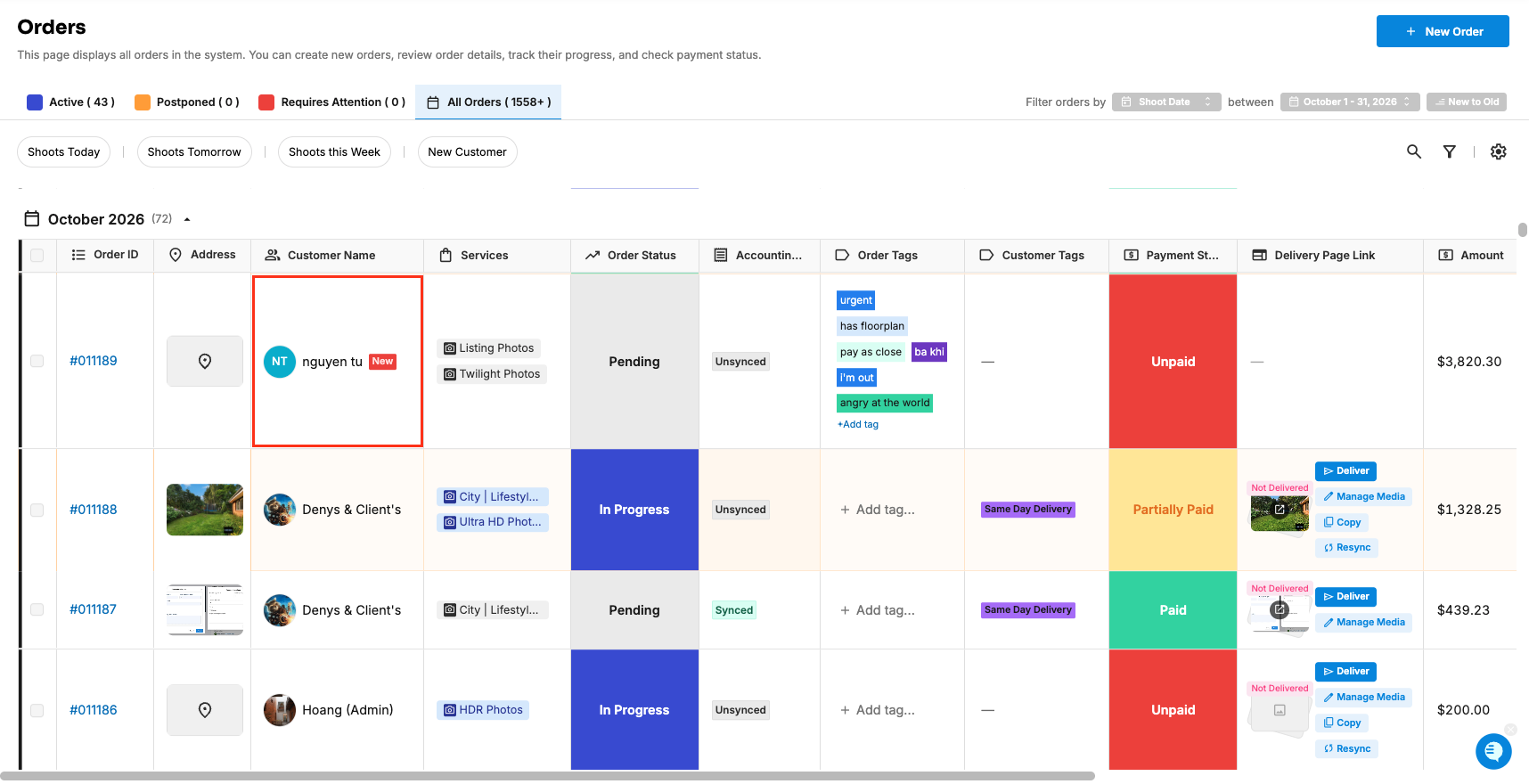
Tonomo adds a New tag beside a client's name on their first order, so you can spot first-time clients straight from the Orders (Beta) page and give them extra attention. To see only those orders, click the New Customer quick filter.
At a glance
A New tag appears beside the client's name, in the Customer Name column, on their first order.
The New Customer quick filter shows only first-time clients' orders.
How does the New tag work?
When a client places their first order, a New label appears beside their name in the Customer Name column on Orders (Beta). Their later orders don't have it.
How do I see only first-time clients' orders?
In Orders Management > Orders (Beta), click the New Customer quick filter. See How Do I Use the Orders (Beta) Page?
Frequently asked questions
Why might a first-time client not show New? The tag is based on the client's first order in Tonomo. A client who booked with you before you used Tonomo, or whose earlier order was imported, may not show it.
What can I do for new clients? Many studios use the tag as a prompt for a welcome call, or to double-check access details before the shoot.
Related articles