How Do Agents Reschedule or Cancel Their Order?
Last updated: September 20, 2026
Overview
Once an agent successfully books an order in Tonomo, they receive an email with their order status and the option to reschedule or cancel it directly.
How It Works
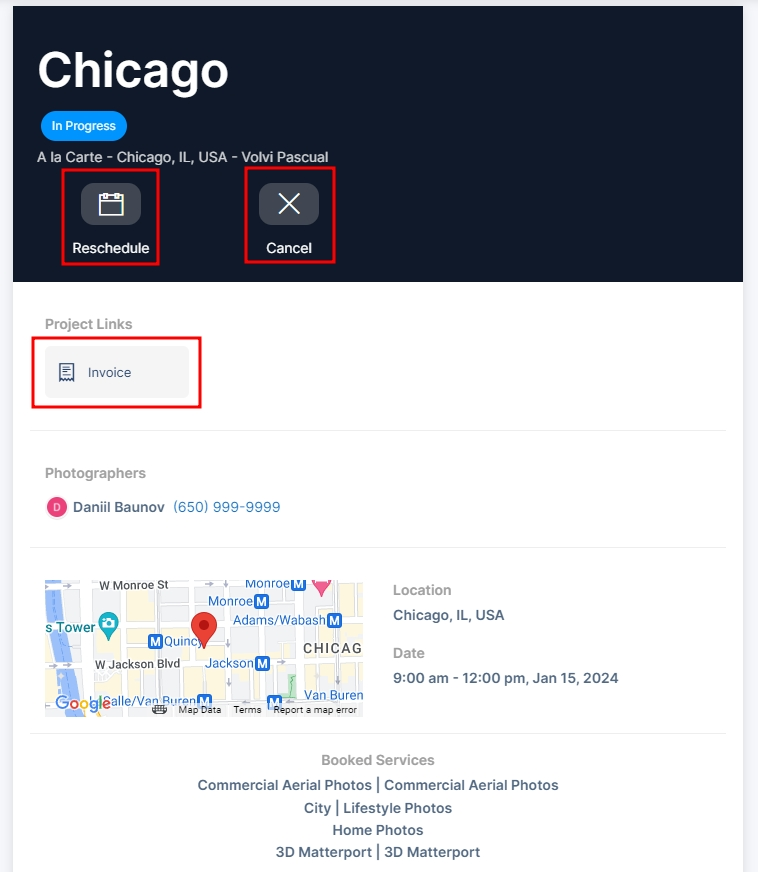
The confirmation email gives agents a link to their order, where they can reschedule or cancel it themselves. The same page also gives them a full overview of their transaction, including their booked services and packages, property details, and their invoice.
Note: You won't be charged by Tonomo for cancelled or archived orders.
Turning On This Feature
Whether agents can reschedule or cancel their own orders is controlled per booking flow. To turn it on, see the Booking Flow Settings > Scheduling Settings guide's Scheduling Settings section.
If you have any questions about agent rescheduling or cancellations, reach out to Tonomo Support and we'll be happy to help.