
How Do I Host And Deliver Videos In Tonomo?
Tonomo hosts your clients' videos for you. When you deliver a video file from the order's Dropbox delivery folder or with Direct Upload, Tonomo copies it to its own video hosting and plays it right on the delivery page. You don't need to upload it to YouTube or Vimeo first. Each hosted video also gets a Share Video link: a page with just that video, on your own listing website domain, that the client can send to anyone.
At a glance
On for every portal. Nothing to switch on.
From Dropbox: put video files in the order's video folder and sync. Tonomo hosts them automatically.
From Direct Upload: upload files in the Videos section (MP4, MOV, FLV, AVI, MKV, WMV, or TS), or add a YouTube or Vimeo link.
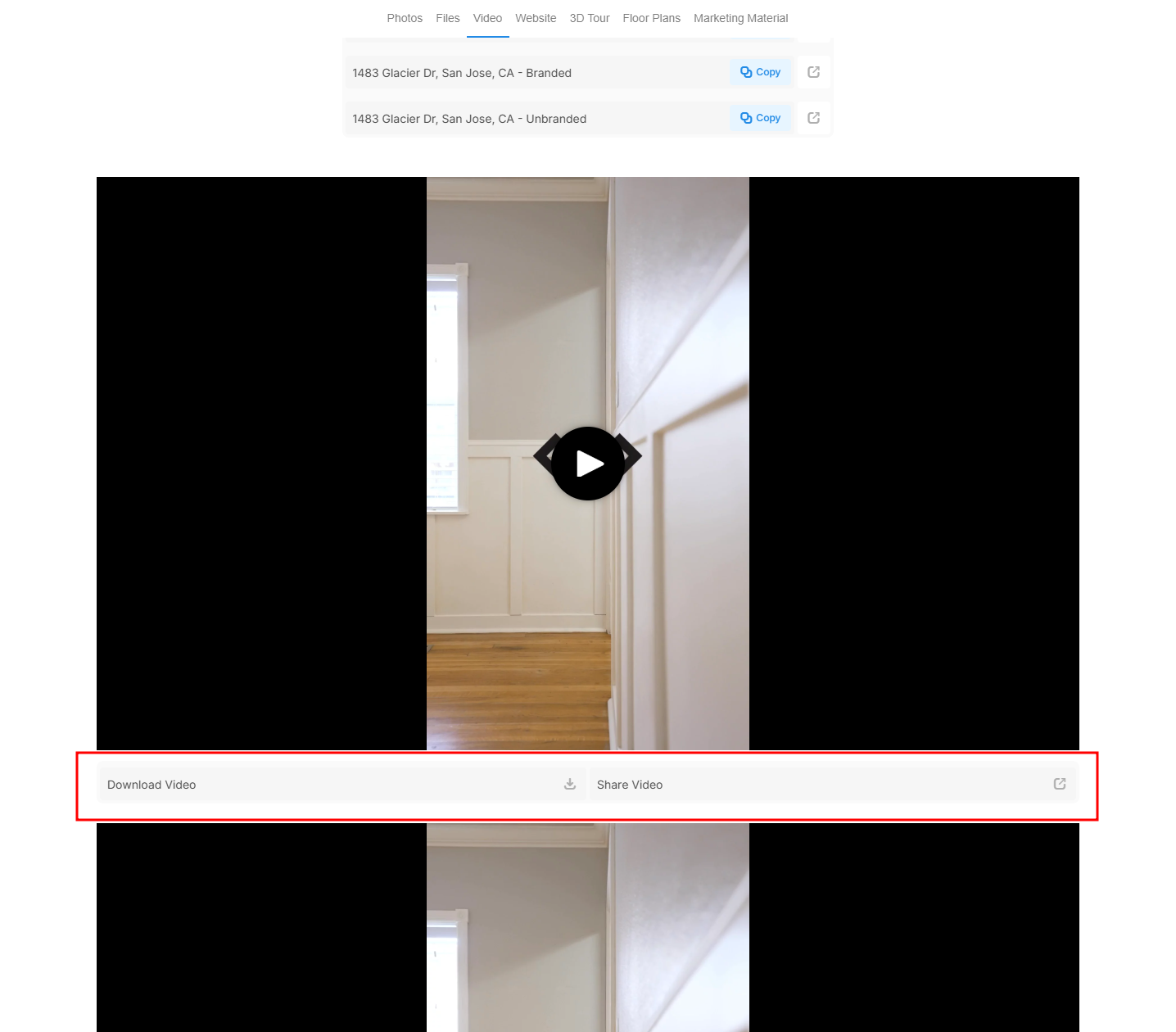
Client gets: a player on the delivery page, Download Video, and a Share Video link to a single video page.
Your branding, not ours: the single video page uses your listing website domain, for example listings.yourstudio.com/video/….
Downloads of uploaded videos appear once processing finishes. Until then, the button says "The video is being prepared for download."
Branded or unbranded: choose where each video shows on the listing websites, or hide it.
If Lock deliverable files until order is paid is on, download and share links stay hidden until the order is paid.
How do I deliver a video from Dropbox?
In Dropbox, open the order's delivery folder and put the finished video file in the folder for the video service (for example, Listing Video).
In Tonomo, open the order's Order Details and click Sync delivery files (or wait for auto-sync, if you use it).
Tonomo finds the video, copies it to its video hosting and adds it to the delivery page.
Which files count? Common video formats, including MP4, MOV, M4V, MKV, AVI, WMV and WEBM.
Which folders does Tonomo check? The folder of any service whose Service Type is Video, or any folder whose name includes video or reel.
Do I still need YouTube or Vimeo shortcuts? No. Upload the video file itself and Tonomo hosts it. Shortcuts to YouTube or Vimeo (.url or .web files) in the video folder still work if you prefer them.
Replacing a video: put the new file in the folder and sync again. Tonomo hosts the new version and removes videos you've deleted from the folder.
How do I deliver a video with Direct Upload?
Open the order's upload area: click Uploaded files in the File Links column on Orders (Beta), or use New Deliverables > Link to an existing order.
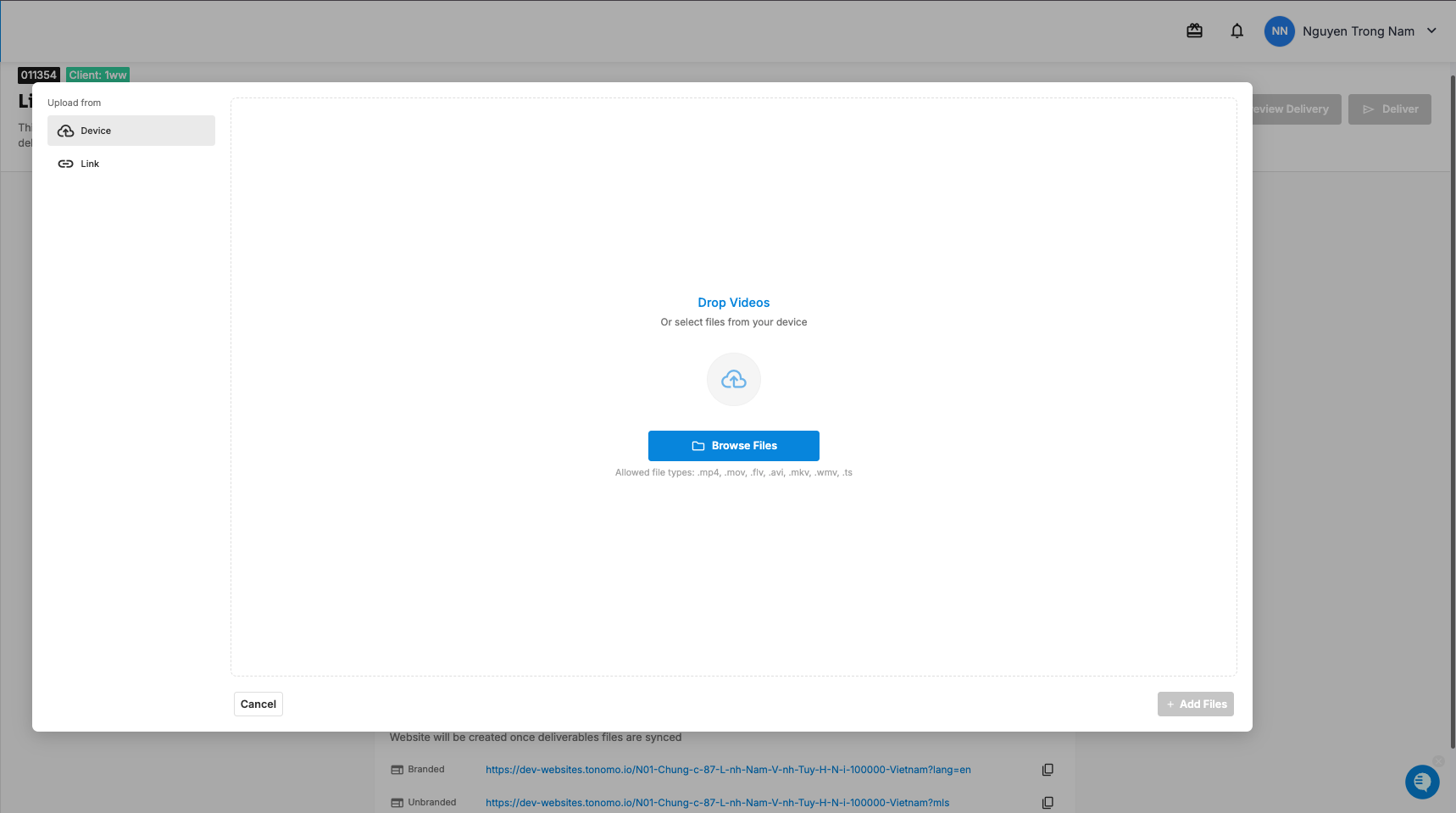
In the Videos section, click the add button (Add Videos).
Either:
drop the files into Drop Videos, or select them from your device (MP4, MOV, FLV, AVI, MKV, WMV or TS), or
choose Add through a link and paste a YouTube or Vimeo link, give it a Title and choose a Display Type. Click Add More for another link, then Embed.
Deliver the order as usual with Preview Delivery and Deliver.
On each video tile you can play it, Copy its link, copy its Embed Code, edit its title, change its display type, or delete it.
See How Do I Upload and Deliver Media Directly in Tonomo?
What is the single video delivery link?
Every video Tonomo hosts gets its own Share Video link on the delivery page ("Open single video delivery page"). It opens a page with just that video, so the client can watch it without downloading anything. It's a focused viewing experience, and the link can also be embedded in other websites.
The link is white-labeled. It uses your portal's listing website domain, not Tonomo's. For example:
https://listings.yourstudio.com/video/…
Agents can share it on social media, in emails or with buyers, and it carries your brand. If your portal has no listing website domain yet, the link opens a standard video player page instead.
Example: an agent wants to text a buyer the property video. Instead of sending a 2 GB file, they open the delivery page, click Share Video next to the video and send the link. The buyer opens a clean page on listings.yourstudio.com and presses play.
What does the client see on the delivery page?
Item | What it does |
|---|---|
Video section | Plays each video on the page. |
Download Video | Downloads the video file. For videos delivered with Direct Upload, it shows "The video is being prepared for download. Please check back shortly." until processing finishes. |
Share Video | Copies the single video page link, or opens it in a new tab. |
Embed code | For YouTube and Vimeo videos: copy-and-paste code to put the video on another website. |
The section starts with "Download or copy your video links below." If the order has Lock deliverable files until order is paid on, the download and share options are hidden until the order is paid. The player still shows.
If you've turned on Hide "Dropbox link" in Configure Booking > General, links that point to Dropbox are hidden from clients. Hosted videos and their Share Video links still show.
How do branded and unbranded videos work?
Videos also appear on the order's listing website. You choose which version shows them:
Direct Upload: set each video's Display Type to Both (unbranded and branded), Unbranded, Branded or Hidden. Hidden videos don't show on the delivery page or the listing websites.
Dropbox: include "Branded" or "Unbranded" in the video's file name. Without either word, it shows on both. Tonomo removes the word from the title.
You can also manage a listing website's videos on its Videos page. See How Do I Set Up a Single Property Website?
Frequently asked questions
Do I need to turn on video hosting? No. It's on for every portal. (It used to be a feature Tonomo enabled for you.)
Why can't my client download the video yet? Large videos take a few minutes to process after uploading. For videos delivered with Direct Upload, the Download Video button shows "The video is being prepared for download" until it's ready. Videos delivered from Dropbox download straight from the Dropbox file.
Can I deliver a YouTube or Vimeo link instead of a file? Yes. In Direct Upload, add it with Add through a link. Only YouTube and Vimeo links are accepted there. In Dropbox, save a web shortcut in the video folder. Clients get an Embed code for these videos.
Is the Share Video link branded with my domain? Yes, on the client's delivery page it uses your listing website domain. The Copy button inside Direct Upload copies a standard video player link instead, so send clients the link from the delivery page.
What happens if I delete or replace the video in Dropbox? After the next sync, Tonomo removes deleted videos and hosts the new file in its place.
Related articles