How Do I Display Or Hide Pricing On My Booking Page?
Last updated: September 29, 2026
Tonomo lets you choose how prices appear to agents on your booking page. You can show the exact price upfront and have it adjust automatically to the property's square footage, which Tonomo calls Dynamic Pricing. You can also price by options such as the number of photos using custom tiers, or hide the individual service prices inside packages so agents only see the total.
At a glance
Dynamic Pricing shows agents the exact price while they book, based on the square footage they enter.
Square footage tiers are set once in Configure Booking > General and used by every service and package.
The same tiers also set how many hours each service is scheduled for.
Custom tiers let you price by something other than size, such as per photo or per deliverable.
Hide Saving amount and Hide service prices in packages are set separately for each booking flow.
Set up your tiers before adding services and packages.
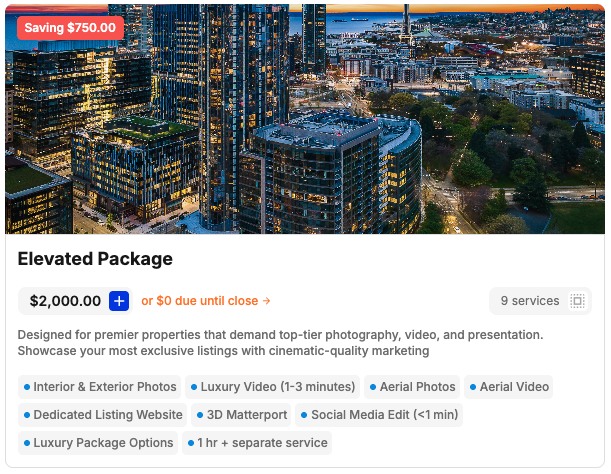
Which pricing approach should I choose?
Before adding services and packages, decide how you want agents to experience pricing:
Approach | How it works | What to set up in Tonomo |
|---|---|---|
Self-checkout | Agents see clear prices upfront, then book and pay themselves | Dynamic Pricing with square footage tiers (below) |
Consultative | Prices are finalized after a conversation with a project manager | Recommended setup, e.g., hiding all prices or a private booking flow |
Most real estate media companies start with self-checkout, because agents can book without waiting on a quote.
What is Dynamic Pricing?
Dynamic Pricing is Tonomo's way of showing agents the exact price they'll pay as they book. The price adjusts automatically to the square footage the agent enters.
Example: if you sell Home Photos for $100 at 1,000 sq ft and $150 at 2,000 sq ft, Tonomo shows $100 or $150 depending on the size the agent enters.
To use Dynamic Pricing, set up square footage tiers first.
How do I set up square footage tiers?
Square footage tiers are the size bands Tonomo uses to set each service's price and scheduled hours.
Go to Configure Booking > General and find Square Footage Tiers.
Tonomo provides a couple of tiers to start with. Edit them, or click + Add Tier to add more.
Click Save.
In each service and package, enter a price and scheduled hours for each tier. See How Do I Set Up The Services I Offer?
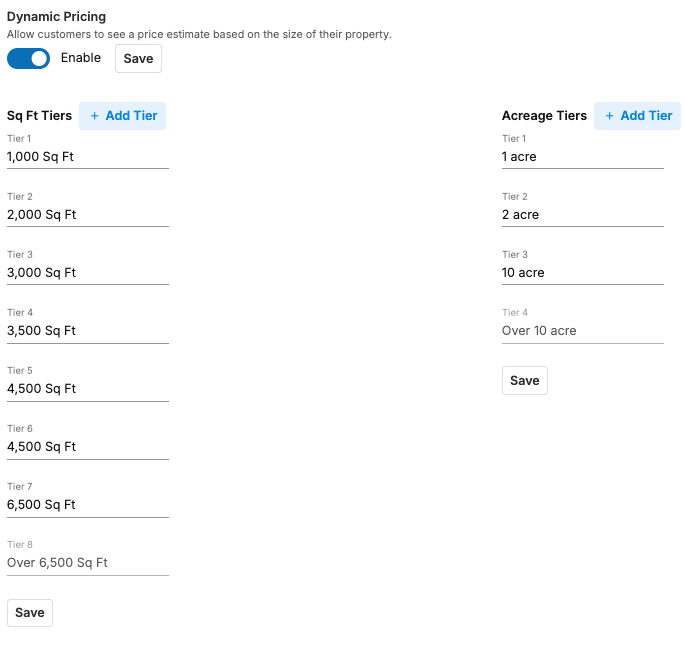
Example: with tiers at 1,000 and 2,000 sq ft, you could set a Drone Tour to take 1 hour at 1,000 sq ft and 2 hours at 2,000 sq ft. Tonomo then books the right length of time and shows the right price for each size.
How many tiers should I use?
If you already use tiers, enter the ones you know.
If you've never set tiers before, a common starting point is 4–5 tiers at 1,000 sq ft steps for residential work, with larger steps for commercial.
You can change tiers at any time. Agents will usually tell you if you have too few or too many.
What if I don't price by square footage?
Use custom tiers. Turn on the Custom Tiers toggle in the Pricing section of any service or package. You can use them two ways.
Custom tiers without square footage
Best for pricing per photo or per deliverable. You set the options agents choose from, for example 1 Photo, 2 Photos, up to 10 Photos. For each option you enter:
the price the agent pays
the scheduling time needed on site
optionally, the contractor payout and editor payout
Payouts are calculated and tracked automatically in Reporting, so you can see what your team is owed.
Each option's price is added to the service's base price. See How Do I Set Up The Services I Offer? for a worked example.
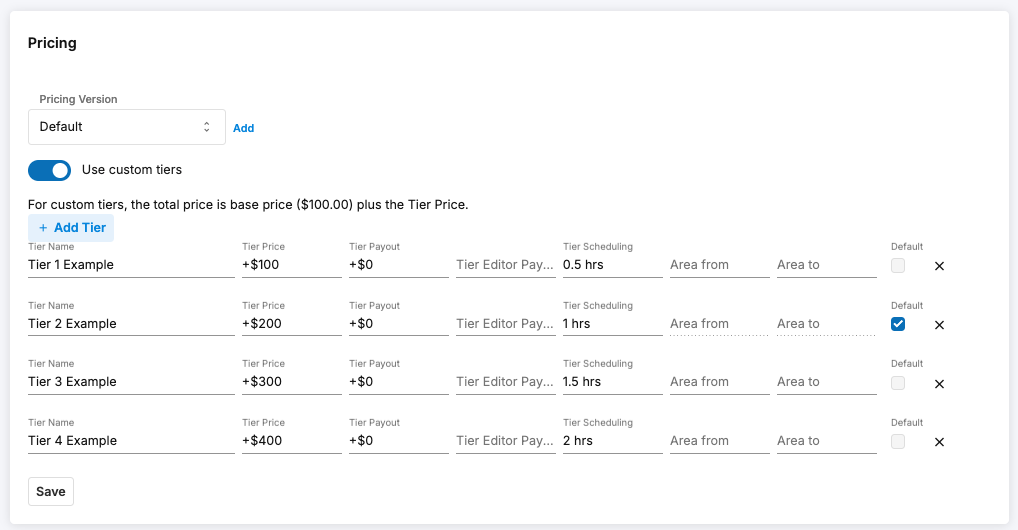
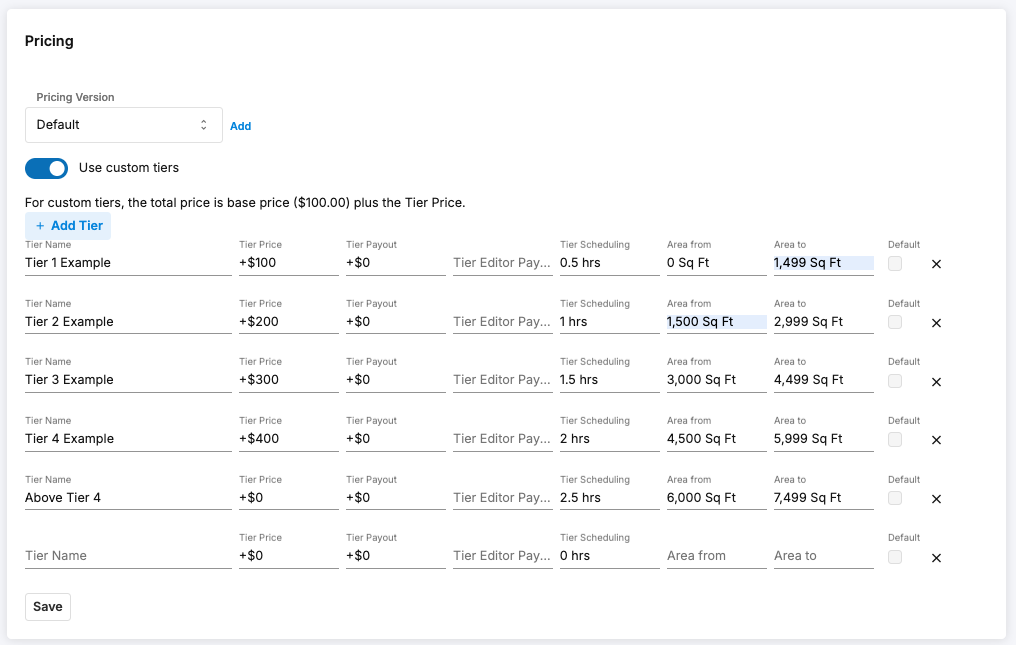
Custom tiers with square footage
Works the same way, but each option only appears for the square footage range you set. Use this to offer different choices at different property sizes.
Example: offer both Drone Photo and Drone Photos with Outline at every size range, so agents can pick either.
Leave the last range open-ended, and that option covers every size above it.
Can I charge one flat price regardless of size?
Yes.
For a service, enter the same price in every square footage tier. This suits services like lifestyle photos.
For a package, fill in only the first tier and click Save.
How do I hide prices on my booking page?
Pricing visibility is set separately for each booking flow. Go to Configure Booking > Booking Flows, click Edit, and use these settings:
Setting | What agents see when it's on |
|---|---|
Hide Saving amount | The "you save" amount in the top-left corner of each package is hidden. |
Hide service prices in packages | Only the package total, not the price of each service inside it. |
Hide Square Footage input | The square footage question isn't asked when typing in the address before seeing the booking page. |
Can different clients see different prices?
Yes. Tonomo gives you two ways:
Custom packages: create packages with negotiated prices for one brokerage or agent, grouped under an Agent Code. They only see those packages when they enter their code. See How Do I Create Packages And Custom Packages?
Private booking flows: create a booking flow that only certain people or brokerages can access, with its own services and packages. See How Do I Create a Booking Flow?
Can I price shoots that aren't priced by square footage, like land or branding?
Yes.
Land lots: set a service or package type to Land Lot, and it's priced by acres instead of square feet. Acreage tiers are set in Configure Booking > General.
Branding shoots: set the package type to Branding and no measurement is needed. The booking flow asks for an office location instead of a property address.
See How Do I Configure Booking Flow Settings?
Frequently Asked Questions
Does Tonomo support square footage pricing? Yes. Dynamic Pricing sets each service's price from the square footage the agent enters, using tiers you define.
Do pricing tiers affect scheduling? Yes. The same square footage tiers set how many hours Tonomo books for each service, so bigger properties can get longer time slots automatically.
Can I change my tiers after I've set up services? Yes. You can edit tiers at any time. Check your services' prices and hours afterwards.
Where do prices show up after booking? Prices from your tiers carry through to Order Management and Reporting.
Can I price per photo instead of per home size? Yes. Use custom tiers without square footage.
Related articles