
How Do I Change The Photographer On An Order?
A lot can change after a booking is made, so Tonomo lets you swap or add photographers on any scheduled order from the Scheduler. Open the order's appointment, click the pencil icon to open Edit event, change the Photographers, and click Save event. Tonomo updates the calendar event and recalculates the travel fee for the new photographers automatically.
At a glance
Start from Orders Management > Orders (Beta). Click the order's Order ID to open Order Details, then open the appointment in the Scheduler.
In Edit event, click the current photographer's name to search for someone else, or use Add photographer to add more.
You can also drag the shoot into another photographer's column on the Scheduler.
When the photographers change, Tonomo recalculates the travel fee and updates the invoice.
Travel is charged Per photographer (the default) or Per order, set in the booking flow's Travel Fees.
To drop a travel fee you don't want to charge, delete it from the invoice.
How do I change the photographer?
Go to Orders Management > Orders (Beta) and click the order's Order ID. Order Details opens on the right.
Open the appointment in the Scheduler:
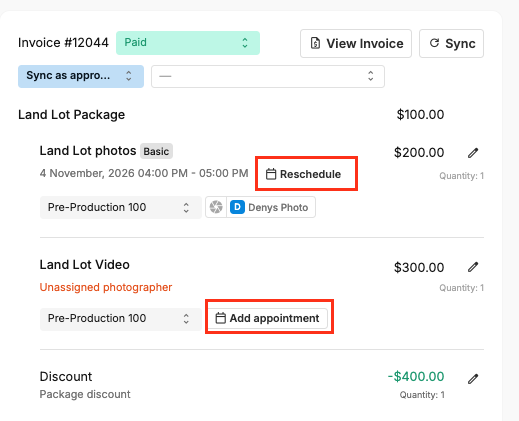
New layout: in Invoices & payments, click Reschedule next to the scheduled service.
Original layout: in the Schedule section, click Open in scheduler.
Point at the event and click the pencil icon (Edit event).
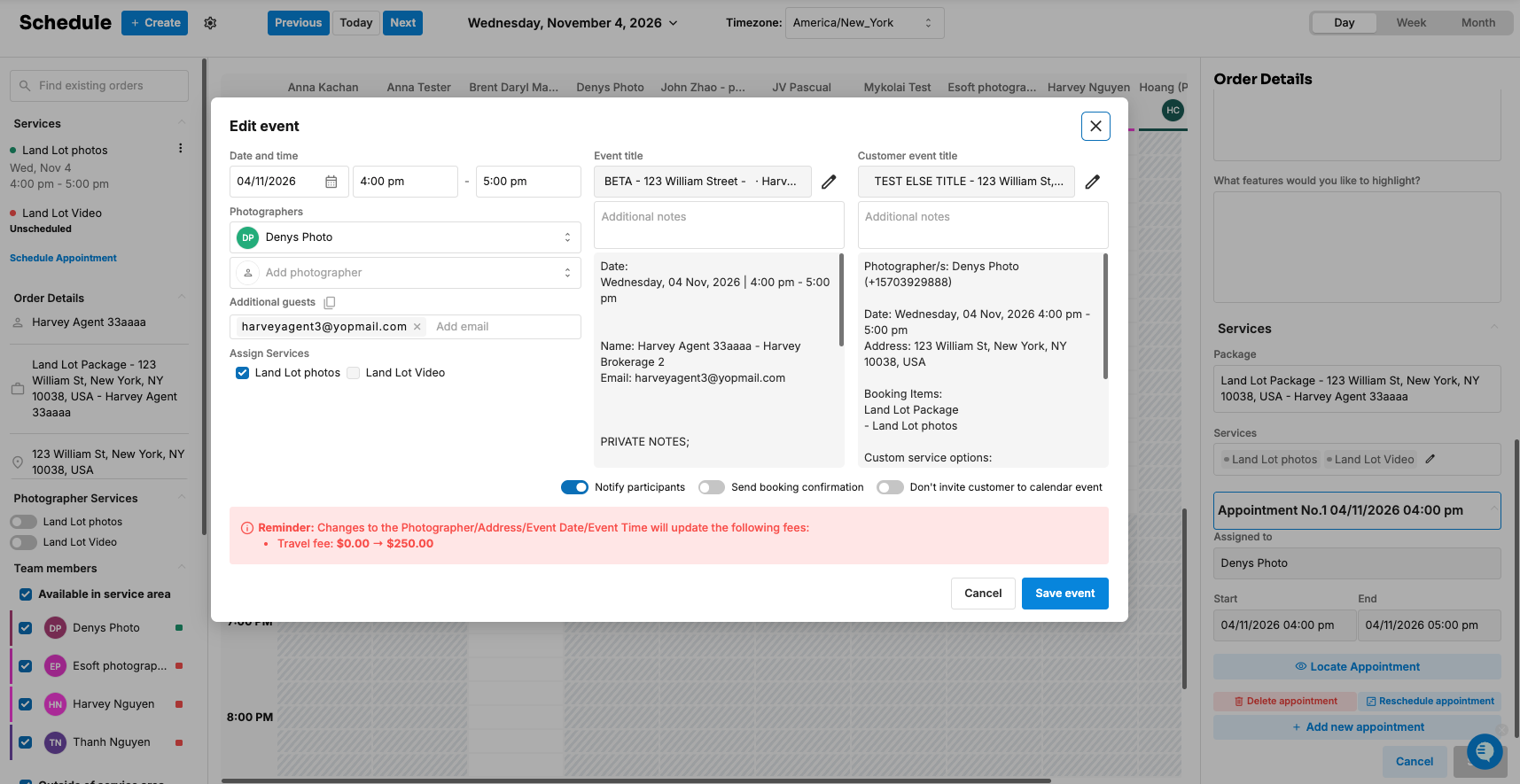
Under Photographers:
To swap: click the current photographer's name and pick someone else from Search photographers.
To add another: click Add photographer and pick them.
To remove one: click the remove (minus) button next to their name. This shows when there's more than one photographer.
Check the Reminder for any fee changes (see below), then click Save event.
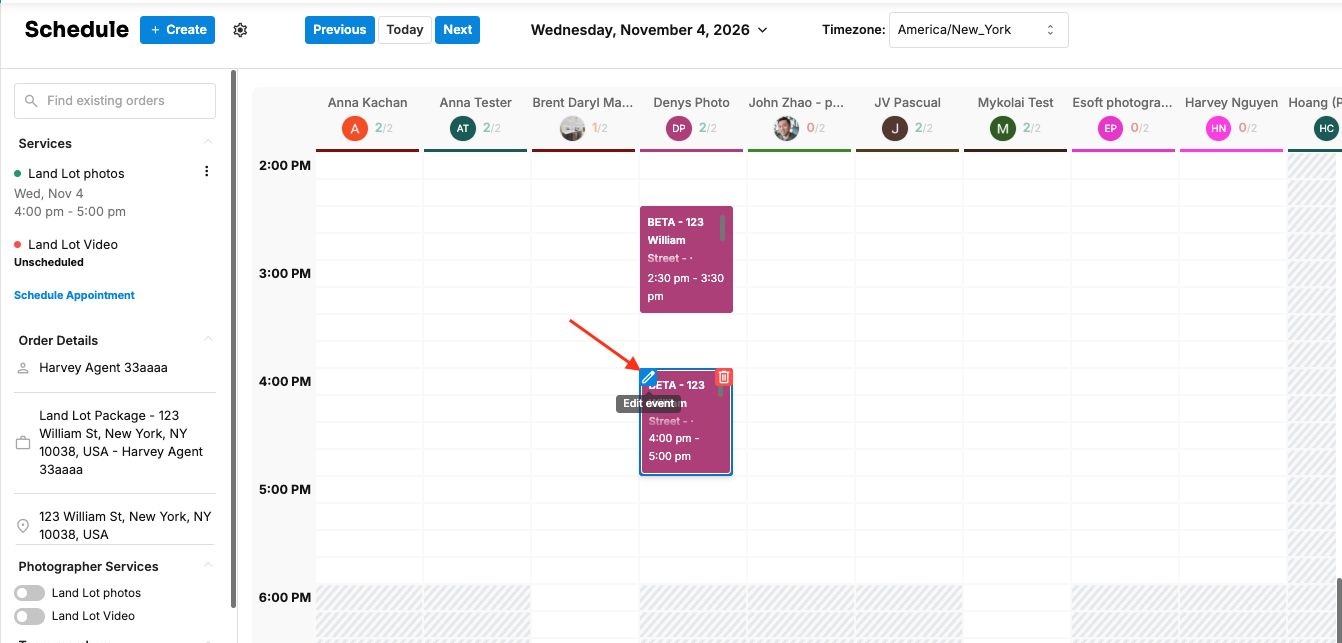
Shortcut: drag the shoot into another photographer's column on the Scheduler. Edit event opens with the new photographer filled in. Click Save event to keep the change.
How does the travel fee change?
When you save new photographers, Tonomo recalculates the travel fee for that appointment and updates the fee lines and total on the invoice. Before you save, Edit event shows a Reminder such as Travel fee: $25.00 → $40.00.
How the fee is worked out depends on the booking flow's Travel Fees setting, 2. How is travel fee applied?:
Setting | How it's charged |
|---|---|
Per photographer (default) | A separate travel fee for each photographer on the shoot, from their own home base. Two photographers means two travel fees. |
Per order | One travel fee per appointment, measured from the home base of whichever photographer travels farthest to the property. |
A photographer without a home base is measured from the booking flow's Office Location. Each order keeps the setting it was booked under, so changing the booking flow later doesn't change existing orders.
Example: a per-order flow. Alex is 10 miles from the property and Sam is 30 miles away. Swap Alex for Sam and the fee is now priced for 30 miles. Add Alex back alongside Sam and the fee stays at 30 miles, because Sam still travels farthest.
If the booking flow has a specific day fee charged per photographer, adding a photographer can change that too.
See How Do I Set Up Travel Fees For My Bookings?
How do I remove a travel fee I don't want to charge?
Delete it from the invoice. In Order Details, find the Travel Fee line in Invoices & payments, click its edit button and choose Delete item, then confirm Are you sure you want to delete this item? Tonomo removes the line, sets the order's travel fee to zero and updates the total.
If Manual Invoice Entry is on for the order, Tonomo doesn't change the invoice when photographers change.
What else happens when the photographer changes?
The calendar event moves to the new photographer's calendar. With Notify participants on, everyone gets an updated invite.
If you use Dropbox RAW folders, Tonomo moves the order's RAW folders to match the new photographers. See How Do I Set Up RAW Folders in Dropbox?
The change is logged in the order's Project Chat, for example removed Alex from scheduled booking. and added Sam to scheduled booking.
Frequently asked questions
Can I send two photographers to the same shoot? Yes. Use Add photographer in Edit event. See How Do I Send Two Photographers to the Same Shoot?
Why did the invoice go up when I changed photographers? The new photographer lives farther from the property, so the travel fee went up. Delete the fee line if you don't want to pass it on.
Does changing the booking flow's travel setting affect existing orders? No. Each order keeps the travel setting it was booked with.
Will the customer know about the change? They get an updated calendar invite if Notify participants is on when you save.
Related articles