How Do I Use The Scheduler?
Last updated: October 1, 2026
The Scheduler is Tonomo's team calendar. It shows every photographer's shoots side by side, together with the other events on their connected Google Calendars, so you can see who's free, move shoots, change who's assigned, and book new appointments directly on the calendar. Open it from Scheduler in the left menu. It's available to Admin and Staff users.
At a glance
Open Scheduler from the left menu. Admin and Staff users can use it.
Each photographer has their own column and calendar colour, in the order you set under Photographers order.
Personal Google Calendar events show as External.
Find existing orders searches every order and keeps your Recent searches.
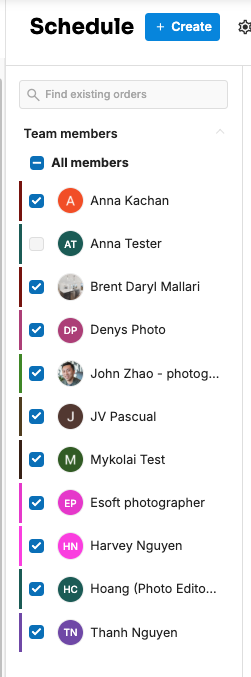
Team members filters which photographers you see, including by the services they perform.
Click an empty time to create an appointment, and click a shoot to see its Order Details.
Deleting a shoot's event doesn't delete the order.
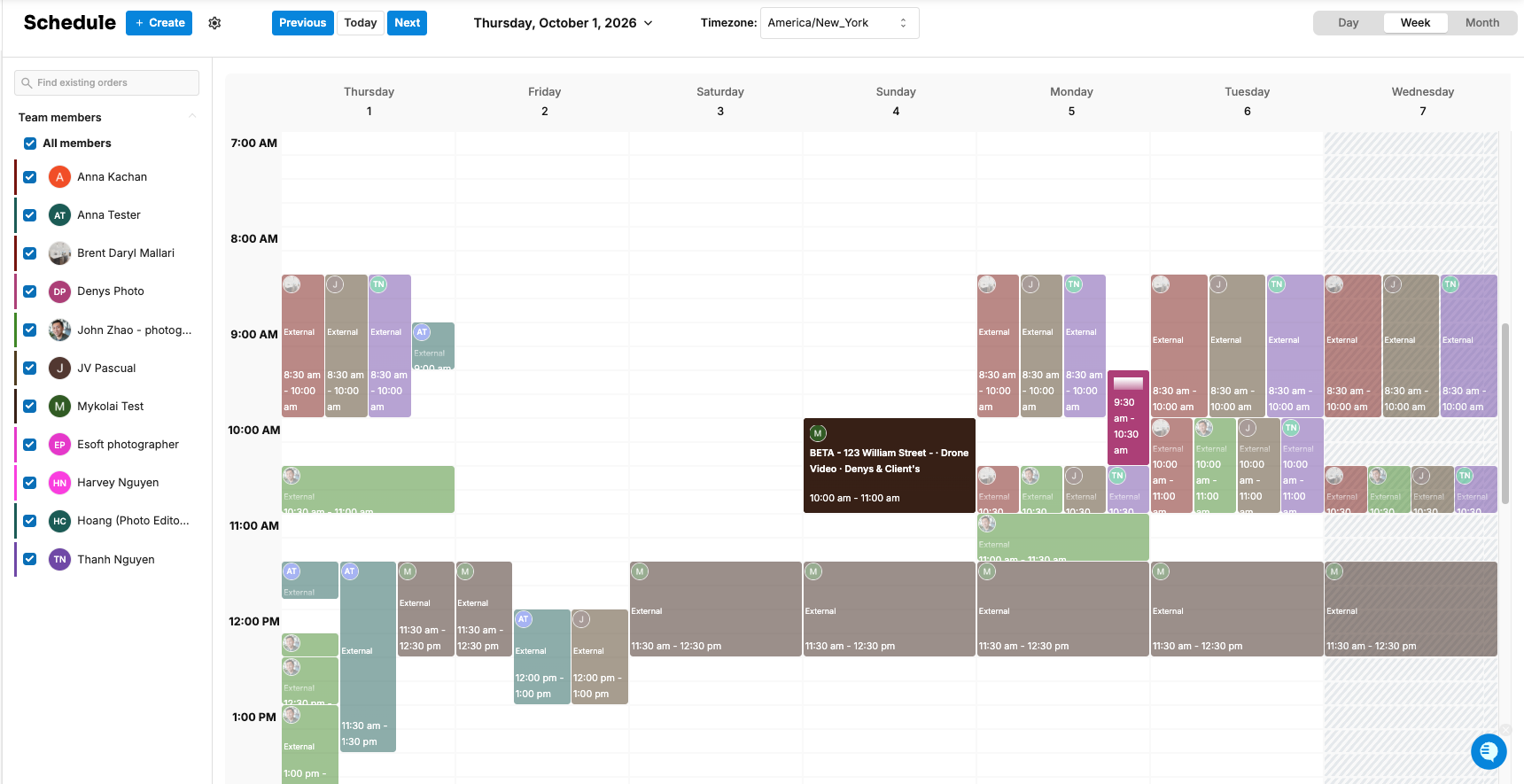
What's on the Scheduler?
Part | What it does |
|---|---|
Photographer columns | One per photographer, in your Photographers order, each in their calendar color |
Shoots | Appointments booked through Tonomo |
External events | Events from the photographer's own Google Calendar, such as meetings or personal time |
Timezone: | Shows which time zone the calendar is displayed in. |
Find existing orders | Search for any order, with your Recent searches saved |
Team members | Choose which photographers to show |
Scheduling settings | A shortcut to Configure Booking > Scheduling |
You can see the calendar by day, week or month. On a phone, the Scheduler opens in a day view.
Calendar colours and photographer order are set in Configure Booking > Scheduling. See How Do I Arrange The Order Photographers Appear In?
How do I show only some photographers?
Open Team members and choose who to show.
To find someone who can do a particular job, use Photographer Services to pick services. Each photographer is then marked as one of:
performs all services
does not perform some services
does not perform selected services
This uses your photographer skillsets. See How Do I Set Up Photographer Skillsets?
How do I find an order?
Type in Find existing orders at the top, for example an address or customer name, and pick the order. Your Recent searches are listed so you can jump back to them.
How do I see a shoot's details?
Click the shoot. The Order Details panel opens with:
Customer and Booking flow
Client Preferences and Customer Notes
Location, which you can Edit, plus Apartment, floor
Services and Package
Brokerage Preferences
The client's preferred times (Time client preferences)
See How Do I Edit Order Details From the Scheduler?
How do I move or change a shoot?
Move it: drag the shoot to a new time, or into another photographer's column to reassign it.
Change its length: drag its bottom edge.
Edit everything else: open the event to change its Photographers, Participants (add an email, or copy the email list), Assign Services, Event title, Customer event title and Description. Tonomo shows whether the new time is busy or available for the photographer: This time is busy or This time is available.
If moving a shoot changes the travel fee, Tonomo shows a Reminder so you can update the invoice.
If Tonomo can't work out how long a shoot should be, you'll see "Some data is missing on the order." Check the order's services and square footage.
See How Do I Reschedule an Existing Order? and How Do I Change the Photographer on an Order?
How do I delete an event?
A shoot booked through Tonomo: delete it from the event. The calendar event is removed, but the order is NOT deleted. Reschedule it later or create a new appointment for it.
An External event: deleting it removes it from Tonomo AND Google Calendar.
Frequently asked questions
Who can use the Scheduler? Admin and Staff users. Photographers use Photographer Schedule to see their own appointments.
Why is a photographer's personal event on the Scheduler? It comes from their connected Google Calendar. Events marked Busy block bookings. See How Do I Set Photographer Availability?
Can I create a new order from the Scheduler? Yes. Click an empty time. See How Do I Create an Appointment or Reserved Timeslot in the Scheduler?
Related articles
How Do I Create an Appointment or Reserved Timeslot in the Scheduler?
How Do Photographers See Their Own Schedule?