How Do I Set Up Photographer Priority Scheduling?
Last updated: September 29, 2026
By default, Tonomo shares bookings evenly among your photographers using round-robin. Turn on Photographer Priority to send bookings to your top photographers first instead. Tonomo then gives each booking to the highest-ranked photographer who's available, and works down your list. You set it up in Configure Booking > Scheduling on the Photographers priority tab.
At a glance
Default: round-robin, with bookings shared evenly.
Go to Configure Booking > Scheduling > Photographers priority and switch on Enable photographers priority.
Drag photographers into order. The top of the list is picked first.
Priority only chooses among photographers who already qualify. It never overrides availability.
It's separate from Photographers order, which only changes how the scheduling calendar is displayed.
Click Save changes to apply.
How does priority work?
Once it's on, Tonomo gives each booking to the highest-priority photographer on your list. If that photographer isn't available at the booked time, Tonomo moves down to the next available photographer, and so on.
Important: priority only decides who is picked first among photographers who qualify, meaning they're available, cover the service area, and have the skillset. It never overrides a photographer's calendar or working hours.
How do I turn on priority scheduling?
Go to Configure Booking > Scheduling.
Open the Photographers priority tab ("Configure photographers priority for booking").
Switch on Enable photographers priority.
Drag photographers by the handle on the left into order. The photographer at the top gets priority.
Click Save changes.
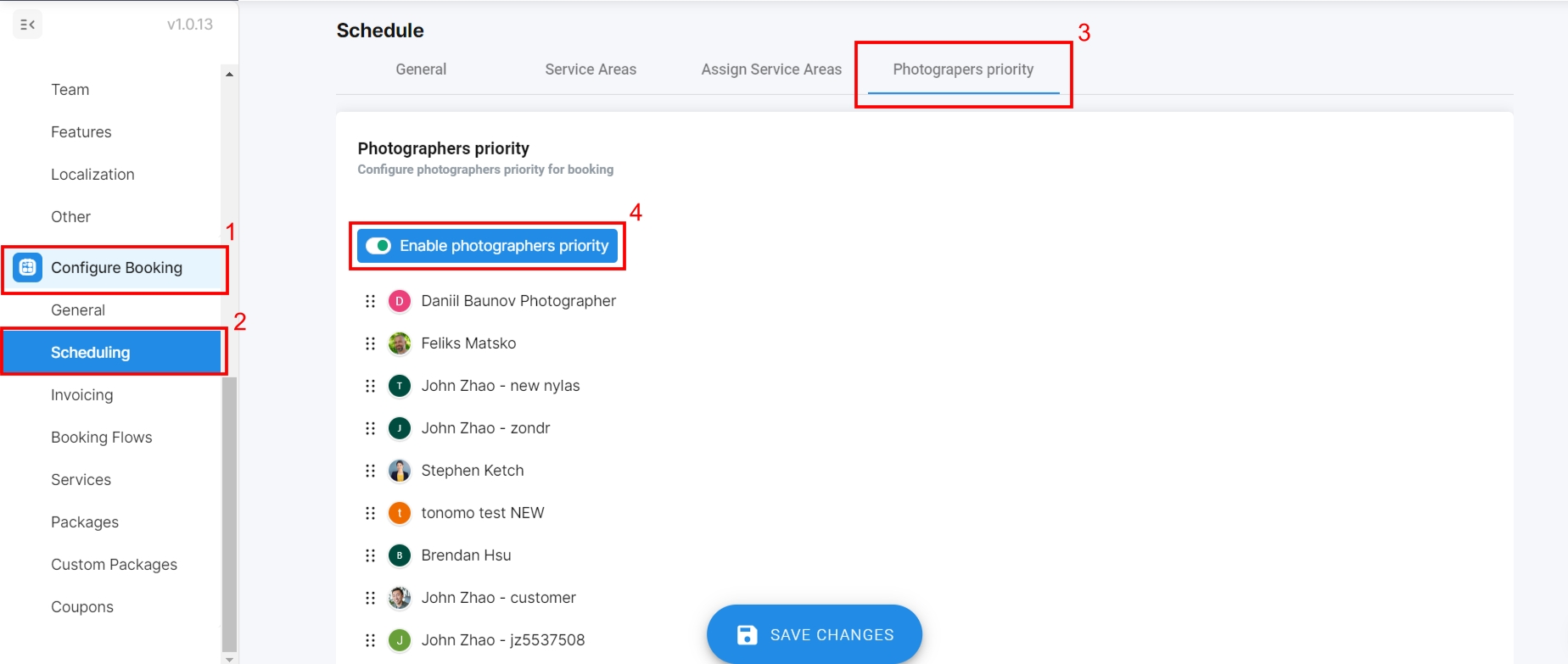
You can reorder at any time. The new order decides who's picked first for bookings from then on.
Is this the same as Photographers order?
No. They're two separate tabs with separate lists:
Tab | What it changes |
|---|---|
Photographers priority | Who gets booked first (when enabled) |
Photographers order | The order photographers are shown on the scheduling calendar. It doesn't affect bookings. |
See How Do I Arrange The Order Photographers Appear In?
Frequently asked questions
Will priority book someone who's busy? No. Priority only applies to photographers who are available and meet your other rules.
What happens when priority is off? Tonomo uses round-robin and shares bookings evenly.
Can customers choose a photographer instead? Yes, if you turn on Allow customers to select photographers in a booking flow. That doesn't work while Restrict to recommended slots when available is on.
Related articles